Skip to content
Announcements
Minimal Graduate Announcement Portrait Card – AI photo made with ChatGPTMade with ChatGPT

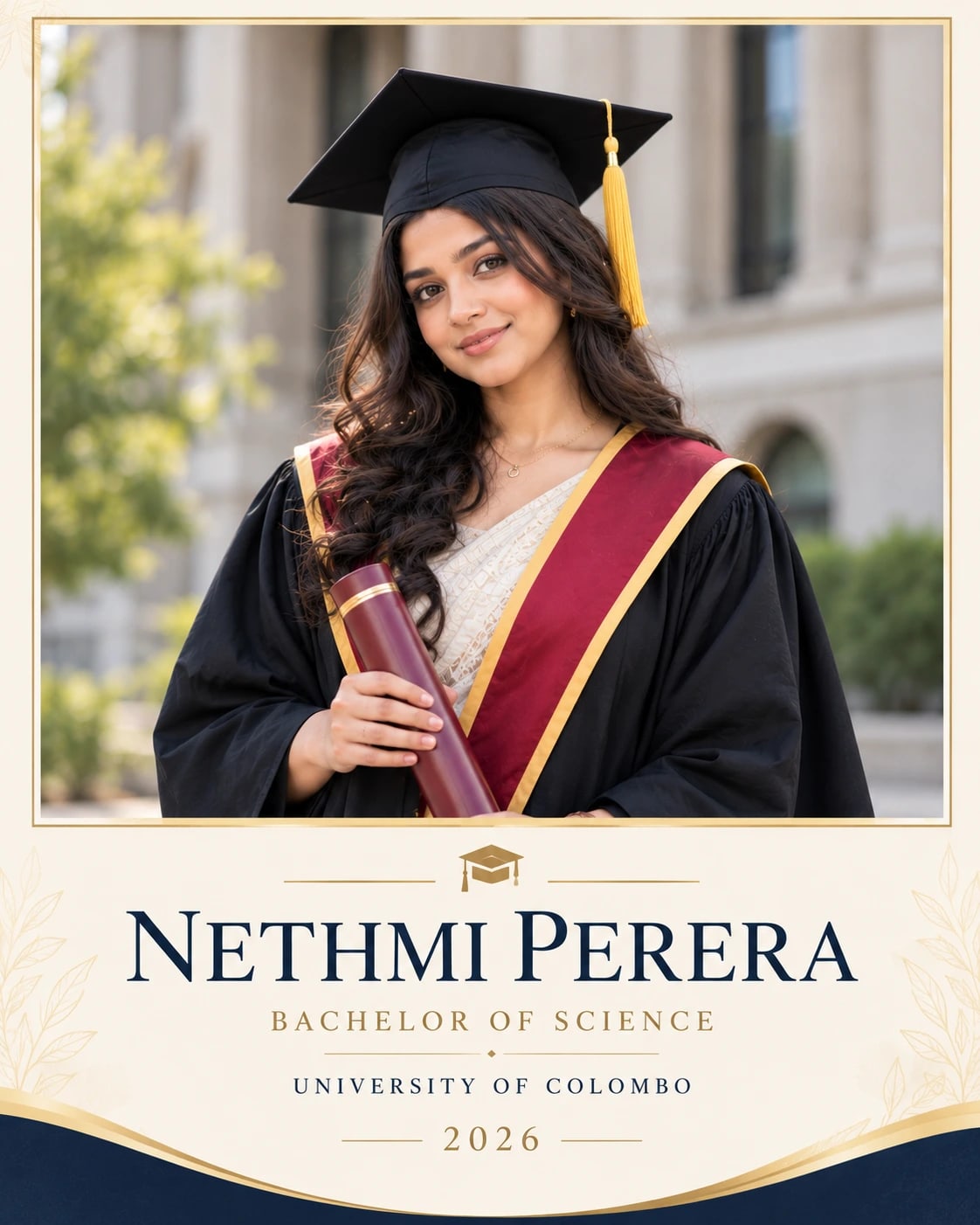
Minimal Graduate Announcement Portrait Card

A graduation announcement card with a clear portrait and personal details.

PROMPT

Use my uploaded photo/photo(s) as the only identity reference for the person. Preserve the real face, age, skin tone, hairstyle, body build, facial proportions and unique identifying features with the highest possible accuracy. Create a polished visual design in a vertical 4:5 aspect ratio, following this specific concept: Minimal Graduate Announcement Portrait Card. Composition and Pose Place the uploaded graduate portrait in a large rectangular upper panel, preserving her actual face, gown and cap. Use a clean lower panel for [GRADUATE NAME], [QUALIFICATION], [INSTITUTION] and [YEAR]. Keep the portrait crop above the waist and the information centred with generous spacing. Clothing, Materials and Styling Cream, navy and muted gold with simple refined typography. Background and Lighting Soft natural portrait lighting and crisp flat graphic text treatment. Identity Preservation — Highest Priority Every face must remain immediately recognisable as the same person in the uploaded reference. Accurately preserve: - Exact face shape, forehead, hairline and facial proportions - Eyebrows, eye shape, eyelids, eye spacing and gaze direction - Nose shape, lips, cheeks, ears, jawline and chin - Facial hair, freckles, moles and other distinguishing details - Real age, skin tone, body build and natural asymmetry - Realistic skin texture and individual identity Do not beautify, reshape, slim, widen, age, de-age, blend, replace or reinterpret a face. Do not mix features between subjects or use generic model faces. Preserve the original hairstyle and hair texture. Keep any makeup subtle and consistent with the real features. In group scenes, maintain the correct count, reference-to-person mapping and believable height relationships. Quality and Finish Maintain clear focal separation, natural scale, correct perspective and consistent illumination throughout the image. Keep anatomy and object construction believable. Render the main subject sharply while allowing only the intended background softness. Preserve subtle detail rather than using excessive sharpening or heavy smoothing. Make the overall visual feel cohesive, carefully composed and suitable for the stated use. Avoid: extra people, extra limbs, missing fingers, fused hands, impossible joints, facial mismatch, covered eyes, blurry faces, exaggerated expressions, plastic skin, busy foregrounds, watermarks and unwanted text. Keep only the text and people explicitly requested in this composition.

Works withChatGPTGeminiMidjourneyFlux

How to use

  1. 1Open ChatGPT or Gemini and upload a clear photo of yourself.
  2. 2Paste the prompt and send it.
  3. 3Not quite right? Ask for small changes, like “warmer light”.

Get new prompts on WhatsApp

New tested prompts every week, straight to your phone.

Join (opens in a new tab)

How to use

  1. 1Open ChatGPT or Gemini and upload a clear photo of yourself.
  2. 2Paste the prompt and send it.
  3. 3Not quite right? Ask for small changes, like “warmer light”.

Get new prompts on WhatsApp

New tested prompts every week, straight to your phone.

Join (opens in a new tab)

About this prompt

About this prompt

What this prompt creates

This prompt creates a polished graduation announcement card that combines a clear portrait with essential achievement details. A cream, navy and muted gold palette gives the design a formal celebratory feel, while refined typography keeps the graduate’s name and qualification easy to read. Soft portrait lighting and crisp flat graphic elements help the photo and text work together without competing for attention. The 4:5 format is a strong choice for digital announcement posts and keepsake cards.

Tips for the best result

  • Use a sharp portrait with the full face and hairline clearly visible.

  • Provide the graduate’s exact name, qualification, institution and graduation year before creating the design.

  • Double-check spelling, especially for degree titles and university names.

  • If the qualification is long, shorten the layout rather than reducing the graduate’s name too much.

  • Keep decorative elements minimal so the portrait and achievement details remain the focus.

  • Add very small supporting text later in an editor if generated lettering is unclear.

Variations to try

Try a white-and-burgundy version with a narrow gold divider for a more formal look. You can also use a navy background with cream typography for stronger contrast. Change one element at a time so the overall hierarchy stays consistent.

Where to use it

This concept works well for graduation announcements, family share cards, achievement posts and printed keepsakes. Keep a high-resolution master version and create separate exports for social media or print. Review names, qualification details and portrait clarity at the final display size before publishing.